CA DMV Wallet
California Department of Motor VehiclesTravel & Local
4.82.64K Reviews
- Version
- 0.2.29
- Installs
- 500.00K
- Age Rating
- Everyone
Screenshots
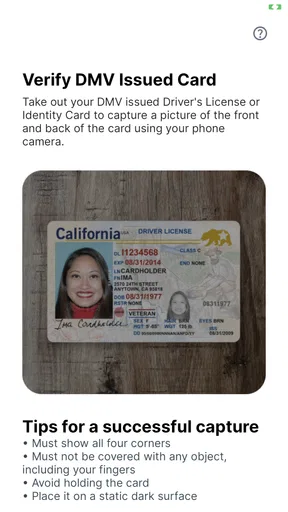
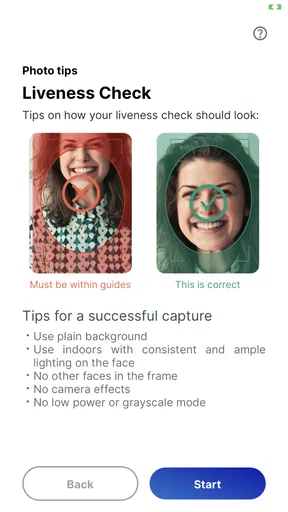
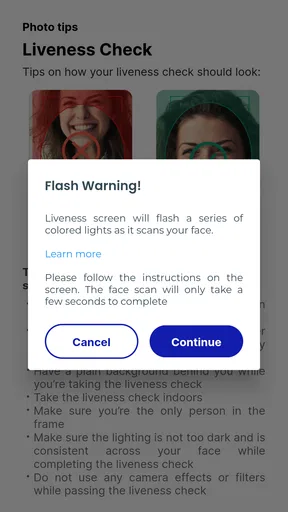
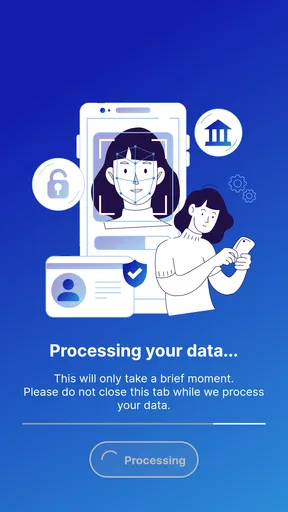
Our Review of CA DMV Wallet
 Analysis by Appyee
When I first looked at CA DMV Wallet, I approached it as a practical travel and local-services tool rather than another app I would open every day. Its purpose is narrow but important: it comes from the California Department of Motor Vehicles and is designed around carrying a California DMV Wallet credential on a compatible mobile device. That focus immediately makes it different from a general wallet app, a navigation tool, or a broad government-services portal.
In my experience, the appeal is simple. If I am leaving home and want to avoid carrying a physical card for a situation where a mobile credential is accepted, having the official state app ready can reduce one small piece of daily friction. It is free, available to everyone from an age-rating perspective, and sits in the Travel & Local category. The app reached the store on May 12, 2023, and its current version is 0.2.29, so I see it as a focused digital identity utility rather than a mature, all-purpose document platform.
From setting up the wallet to using it in the real world
I find the setup-to-use journey most useful when I treat it as preparation, not a last-minute shortcut: I would verify that the credential is ready at home, then keep the physical card available for places that may not accept a mobile version. That small habit makes the wallet more dependable in everyday errands and keeps a phone issue from derailing an appointment. The next section looks at what to expect from the app’s speed and workload.
The starting condition matters more than the download
The first thing I would ask before installing it is not whether the app looks polished, but whether it fits the situation I am preparing for. CA DMV Wallet makes the most sense for a California resident who wants a state-issued mobile credential available alongside, or in some cases instead of, a physical card. It is less useful for a visitor, someone with no California DMV credential to add, or a person expecting it to replace every form of identification everywhere.
That distinction is important because a digital credential is only helpful when the receiving person or organization knows how to handle it. I would not treat the app as a universal pass that automatically works at every checkpoint, rental counter, venue, business, or government office. My practical advice is to keep the physical credential with you until you already understand where the mobile version is accepted. The wallet can be a convenient backup or alternative, but convenience should not be confused with universal acceptance.
The installation itself is straightforward in concept: I would search for the official app, check that the developer shown is California Department of Motor Vehicles, and confirm that my device meets the minimum operating-system requirement of iOS or Android 11. That last check is easy to overlook. If the phone is older and cannot run the required system version, the problem is not the account or the credential; the app simply is not a suitable option for that device.
The store presence gives the app some useful reassurance. It is free, has an average rating of 4.8 from around 29 thousand ratings, and has passed half a million installs. Those figures do not prove that every user will have a smooth setup, but they do suggest that the app is being used as a real service rather than functioning only as a concept or promotional shell.
Adding the credential is the first serious handoff
After opening the wallet, the important transition is from the app itself to the DMV identity process. This is where I would slow down and read each instruction rather than tapping through quickly. A wallet holding an official credential needs to connect the person using the phone with the underlying DMV record, and that is a different task from creating an ordinary shopping or social-media account.
I would complete the setup in a quiet place, with my personal information and existing DMV details available if the app requests them. I would also make sure the name and details I enter match my official record. Small differences in spelling, formatting, or outdated information can create avoidable friction in any identity-verification flow. If the process pauses for verification, I would avoid repeatedly starting over; a careful review of the on-screen instructions is usually more useful than creating several partial attempts.
This is one of the app's less obvious trade-offs. The official connection is the reason the wallet can be trusted more than a screenshot or a photo of a card, but that same connection makes setup less casual. I cannot simply type in a number, save an image, and assume I have a valid credential. The extra care is worthwhile for authenticity, yet it means the app is not ideal for someone who wants instant, anonymous access.
I also recommend setting up the wallet before the day it is needed. Trying to enroll while standing in a queue, boarding transport, or approaching a checkpoint is poor timing. A verification step, a device issue, or an unexpected request for additional action can leave me dependent on the physical card I thought I had replaced. The best workflow is to prepare at home, test that the credential is visible, and only then decide whether carrying the physical version remains necessary for that particular outing.
Checking the credential before leaving home
Once the wallet is configured, I would do a short pre-trip check. I would open the app, confirm that the credential appears correctly, and make sure I know how to reach it without searching through unrelated apps. This is especially useful when the phone is nearly full, the battery is low, or I am going somewhere with limited connectivity. I would not wait until a person is asking for identification to discover that I have forgotten the sign-in details or that the phone needs attention.
This preparation also clarifies what the app does not replace. CA DMV Wallet is not a travel planner, map, ticket wallet, or general storage area for every document. If I am flying, renting a car, checking into accommodation, or crossing an organization-specific security process, I still need to follow that provider's rules. The mobile DMV credential may help in a qualifying interaction, but it does not remove the need for a passport, booking confirmation, payment card, physical license, or other document when those are required.
That is where the comparison with ordinary alternatives becomes useful. A physical card works without a charged phone or a compatible operating system, and most people already know how to present it. A generic phone wallet is convenient for payment cards and passes but is not automatically an official DMV credential. A photograph of a license is easier to save but is a weak substitute because the person checking it may not accept an image as proof. The state wallet occupies a middle ground: more purpose-built than a photo, but more dependent on technology and acceptance rules than plastic.
A realistic everyday scenario
Imagine that I am heading out for an afternoon appointment and want to travel light. Before leaving, I open the wallet, confirm that my California DMV credential is available, and keep my phone charged. At the destination, the staff member asks for identification. I explain that I have the mobile DMV credential and wait to see whether their process supports it. If it does, the handoff moves from my phone to the staff member's approved checking process. If it does not, I use the physical card instead.
That scenario shows the product's real value better than a simple claim that it “replaces” a card. The benefit is not that I can ignore every other document; it is that I have an official digital option ready for an appropriate interaction. The best result is a shorter, lighter routine. The worst result is only a few extra seconds if I have prepared properly and retained the physical backup.
I would use a similar approach when moving between places during a day. Rather than handing my unlocked phone to someone, I would pay attention to the app's presentation and to the instructions given by the person checking the credential. Digital identity should be treated as sensitive. I would avoid displaying unrelated notifications, messages, or personal information, and I would not leave the phone unattended while the credential is open.
Handoffs are where convenience meets reality
The most important handoff is between the wallet and the person or organization receiving the credential. The app can present an official DMV credential, but it cannot force a business to accept that format. This is the central limitation I would explain to a friend: the app improves my preparation, not the other party's procedures.
There is also a handoff between the phone and the operating system. A compatible device is necessary, and the phone must remain usable when I need the credential. A dead battery, damaged screen, forgotten passcode, or system problem can interrupt the process even though the DMV record itself is fine. For that reason, I see the wallet as an additional access route, not a reason to abandon every physical alternative immediately.
Another handoff occurs when the person checking the credential is unfamiliar with the app. In that moment, patience matters. I would not assume that showing a screen is enough; I would follow the receiving party's instructions and avoid arguing that the app must be accepted simply because it is official. This is a subtle but important difference between owning a digital credential and having a smooth interaction with it.
For families, the workflow also deserves care. I would not assume that one person's phone can casually serve as everyone's credential. Each identity should be handled according to the app's own setup process, and I would avoid mixing accounts or saving sensitive details in notes or screenshots. The wallet is most useful when the credential-to-person relationship remains clear.
What the result looks like when everything works
When the setup is complete and the receiving organization supports the wallet, the result is pleasantly focused. I can reach the DMV credential from a dedicated app instead of searching through photos or carrying another physical item. The official source gives the presentation more credibility than an improvised digital copy, while the free price removes a financial barrier to trying it.
The app's strongest quality is restraint. It does not need to become a sprawling travel platform to be useful. For a California driver or identification holder who regularly encounters compatible acceptance points, a direct path from opening the app to presenting the credential is more valuable than a long list of unrelated features. The high average rating and large user base reinforce my impression that this narrow purpose resonates with many people.
Still, I would judge success by the entire trip, not just by the app screen. If I need to carry the physical card anyway because acceptance is inconsistent, the wallet becomes a convenience layer rather than a full replacement. That can still be worthwhile, particularly when I prefer not to expose a physical card or want a digital option available in a specific setting. It simply means the outcome depends on context.
Where the flow breaks
The first likely break is eligibility or device compatibility. Someone using an older phone that cannot run iOS or Android 11 will not get the intended experience. Another break can occur during identity verification, especially if the user's DMV information is outdated or the setup is attempted in a rushed environment. These are not reasons to dismiss the app, but they are reasons to prepare before relying on it.
The second break is acceptance. A business may still require a physical credential, may not recognize the mobile format, or may have staff who are not trained to process it. This is the point at which a generic wallet app or a photo might appear simpler, but neither offers the same official purpose; the real answer is to carry the document required by the destination. I would skip relying on CA DMV Wallet alone if the appointment has strict identification rules and I have not confirmed that a mobile credential is accepted.
The third break is phone dependence. If my battery is low or the device is unavailable, the digital route disappears. I would also be cautious when traveling outside situations where a California DMV credential is relevant. The app is not a substitute for travel documents, and it should not be treated as one simply because it lives on a phone.
There is a further privacy and social friction to consider. Presenting a phone can expose more of my screen than I intend, and handing the device to another person is uncomfortable. I would keep the display controlled, use the app's own presentation rather than a screenshot, and retain possession of the phone whenever the receiving process allows it. That habit is more important than any visual polish.
Who should install it, and who should skip it
I would recommend CA DMV Wallet to California residents who want an official mobile DMV credential, use a compatible phone, and are willing to keep a physical backup while acceptance becomes familiar. It is especially sensible for people who already prefer digital passes and want a state-specific option instead of relying on a photograph or an unofficial workaround.
I would be more cautious about recommending it to occasional users who rarely need to show identification, people with older devices, or anyone who expects a digital credential to work in every business and travel situation. If the main goal is international travel, broad document storage, or managing tickets and payments, a passport, physical identification, or a general wallet app will remain more appropriate for those tasks.
My final view is that this is a useful specialist tool, not a universal identity replacement. The California Department of Motor Vehicles has made a focused app that can simplify the right interaction, and its free access makes experimentation easy. I would install it, complete the setup well before needing it, test the presentation, and continue carrying the physical credential until I know the places I visit will accept the mobile version. Used that way, CA DMV Wallet earns its place on my phone without asking me to pretend that every real-world handoff has already become digital.
Verdict
Strengths of CA DMV Wallet
- Keeps your mobile driver’s license available without carrying the physical card.
- Uses device security features to help protect access to license information.
- Can simplify identity checks where participating businesses accept mobile credentials.
- Reduces the need to repeatedly show extra personal details during supported checks.
- Helpful backup when your physical license is misplaced or left at home.
Limitations of CA DMV Wallet
- Acceptance is limited to participating agencies, businesses, and verification locations.
- A compatible smartphone and supported operating system are required.
- A dead battery or damaged phone can prevent access when you need identification.
- Not a complete replacement for carrying your physical California driver’s license.
- Sharing or replacing devices may require additional setup and identity verification.
Similar Picks in This Category
View All
Google Maps
Google LLC3.4

Google Maps Go
Google LLC4.1

Booking.com: Hotels & Travel
Booking.com Hotels & Vacation Rentals4.8

Google Earth
Google LLC3.8

Skyscanner Flights Hotels Cars
Skyscanner Ltd4.8

trivago: Compare hotel prices
trivago N.V.4.4
Frequently Asked Questions
What is CA DMV Wallet, and what can I use it for?
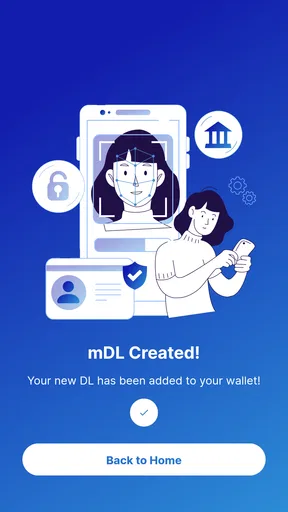
CA DMV Wallet is California’s official mobile wallet for storing and presenting eligible digital driver’s license and identification credentials. After setting it up, users may be able to verify their identity at participating locations without handing over their physical card. It is designed for supported identity-checking situations, but it does not replace your physical driver’s license or identification card everywhere.
How do I add my California driver’s license or ID to the app?
To enroll, you generally need a valid California driver’s license or identification card, a compatible smartphone, and a camera for identity verification. The app guides you through scanning or entering card details, taking a selfie, and completing security checks. Make sure your information is accurate, use good lighting, and follow every verification instruction carefully to avoid delays or enrollment errors.
Where can I use my digital license from CA DMV Wallet?
A digital California driver’s license or ID can only be used where digital credentials are officially accepted and the organization has the appropriate verification equipment or process. Acceptance may vary by airport security checkpoints, government services, businesses, and other participating locations. Before relying on the wallet, check whether the specific destination supports it and carry your physical card as a backup.
Is CA DMV Wallet safe, and what happens to my personal information?
The wallet is designed with security features intended to protect your identity, including device-based access controls and digital verification methods that can reduce the need to show your full physical ID. However, users should still protect their phone with a strong passcode, biometric lock, and current software. Review the app’s privacy information to understand what data is collected, processed, or shared during enrollment and verification.
Do I still need to carry my physical California driver’s license or ID?
Yes. CA DMV Wallet should be considered a convenient digital companion rather than a complete replacement for your physical credential. Not every law-enforcement interaction, business, government office, rental service, or travel situation accepts a mobile ID. Your phone may also lose power, become damaged, or fail to connect, so carrying the physical California license or identification card remains the safest option.
